Coming soon — and open to try today
The whole heating system, on one screen
Zones, heat sources, hot water, ventilation and solar — read and controlled from a single app, by the installer who looks after the plant and by the family living in it.
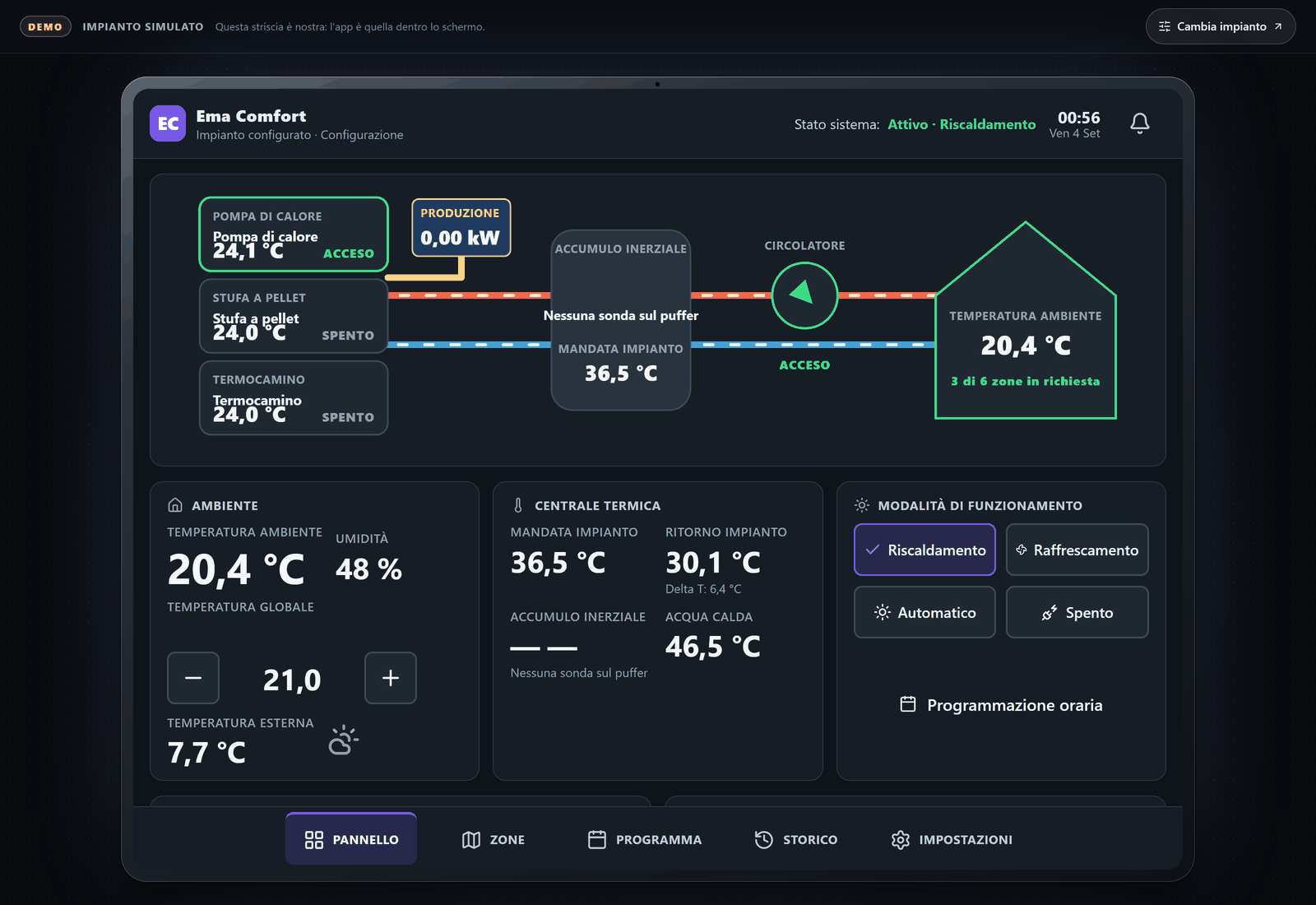
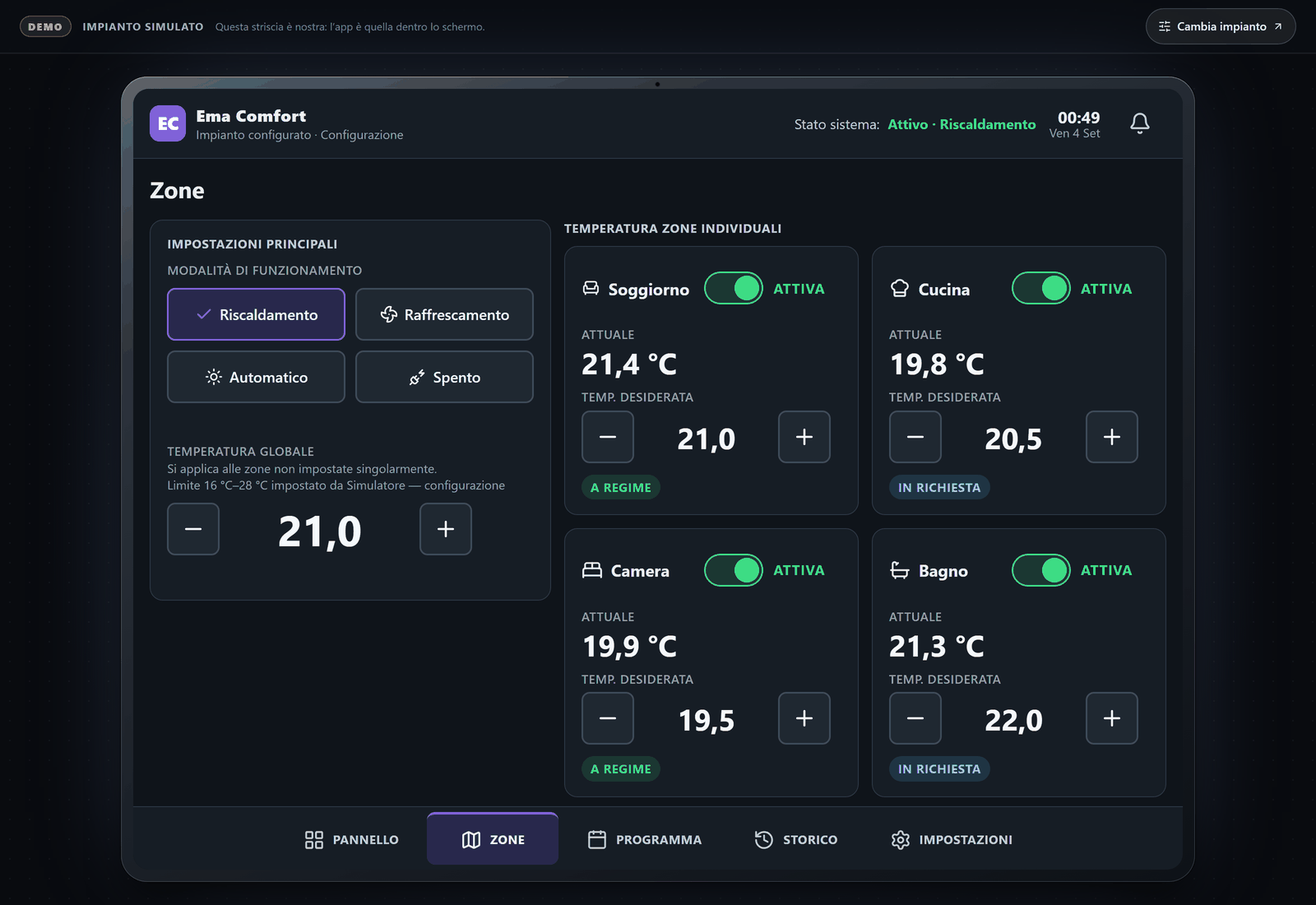
Three of six zones asking for heat, the heat pump running, flow and return from the plant room.
No account, no installation. Everything you see is simulated: the plants are invented and no real home is shown.
Not on sale yet
Ema Comfort is going in with its first two customers. There is no price, no signup and no trial on this page, because none of them would be true.
The sandbox is the real app
What opens from this page is the application itself, running on an invented plant. Not a video, not a mockup, and not a cut-down preview.
It wears the installer’s name
On an installer’s own address the app carries their name, their monogram and their colour. Inside the app, Ema Comfort appears only under Settings › About.
Built by puglieseweb LTD
A company registered in England and Wales. Hosting, sub-processors and retention are written out on the company’s trust page — exceptions included.
Read the trust page
Public sandbox
Build a plant, then open the app on it
The whole plant travels in the link, so you can describe the system you actually look after — how many zones, which heat sources, solar or not — and open the app already running on it.
Everything in the sandbox is simulated — the plants are invented and no real home is shown. The app itself speaks Italian and English; it opens in Italian, which is where Ema Comfort is being installed first.
What it does
One app for the whole plant
Heating is rarely one machine. Ema Comfort treats the system as it actually is — several sources, several zones, and hot water competing with all of them.
Every zone, one screen
One to eight heating zones, as many as the controller declares, each with its weekly schedule, its target and its current reading — seen together rather than one thermostat at a time.
Heat sources in cascade
Up to four sources — heat pump, gas boiler, pellet stove, wood burner — in the order the installer sets, with the second brought in after a delay you configure. The priority is declared, never guessed at.
Hot water as its own service
Cylinder temperature, charging state, a target between 35 and 65 °C, a timed boost, and a diverter valve whose priority over heating is set rather than assumed. The anti-legionella cycle is written out in words, with its day, its hour and its temperature.
Solar, honestly reported
Production, consumption, grid import and export, battery charge and discharge, in the same picture as the heat. Where the heat pump sits behind a read-only connector, the app says so instead of offering a switch that would do nothing.
It never fakes a reading
A silent controller or a stale cloud source marks its values out of date and refuses commands, rather than showing the last number it happened to hold. Where a probe does not exist, it says the reading is absent.
Third-party systems too
A controller Ema Comfort did not install is read through a connector — visible and monitored on the same screens — and every refusal to command it names its reason. History for a third-party source is not kept yet.
Who it is for
Two people use it, and they need different things
The same plant, seen twice: once by whoever is responsible for it, once by the family living on top of it.
For installers
Every plant you look after in one list, with the state of each and the history behind it — so a call about a cold house starts with what the system was actually doing, not with a drive out to read a display.
- The fleet: connection, open alarms, firmware and last contact, plant by plant
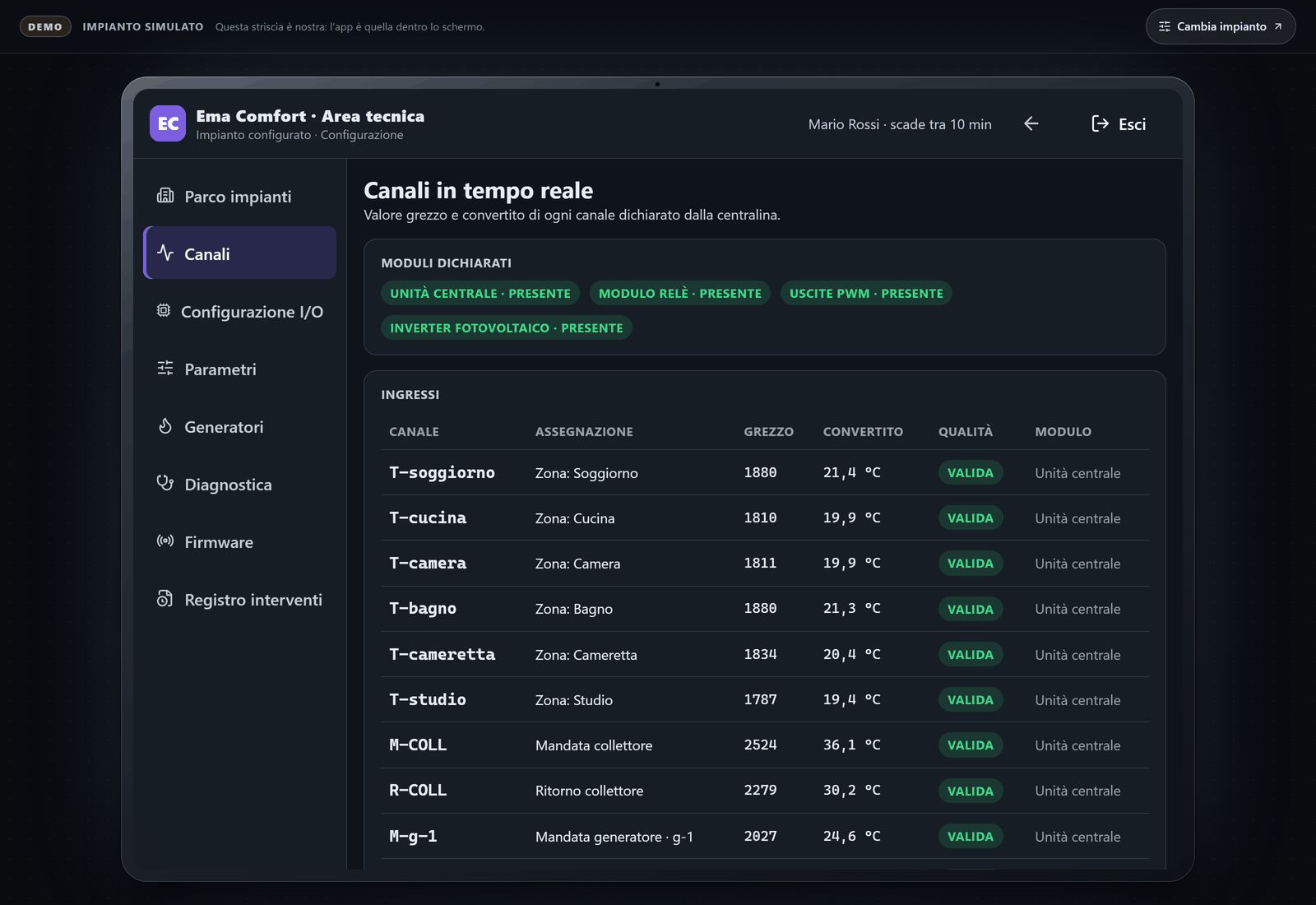
- Every channel raw and converted, remappable, with its sensor type and calibration
- Forced outputs for commissioning, always timed out by the controller itself
- Signed-firmware updates with rollback, and an append-only record of who changed what
- The same functions remotely as on site
For the homes they look after
One app for the whole house: what each room is set to, when the hot water runs, and what the plant is doing — without having to understand the plant behind it.
- A target per room, inside limits the installer set — and the app says who set them
- Weekly schedules, and quick profiles for home, away, night and holiday
- Heating, cooling, automatic or off, in at most two taps
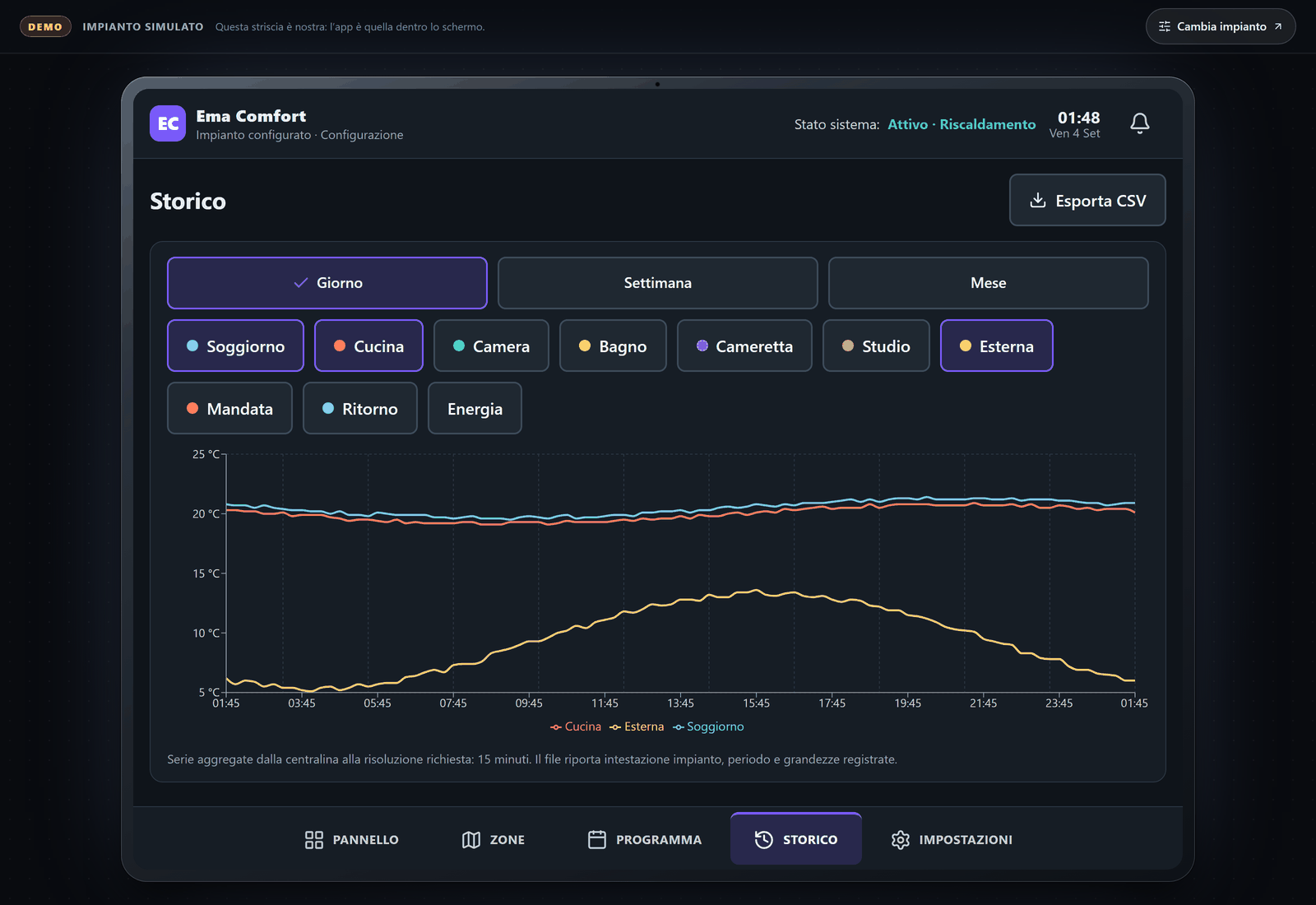
- History by day, week and month, exportable as a spreadsheet
- Touch targets and text sizes designed, and tested, for a person over sixty
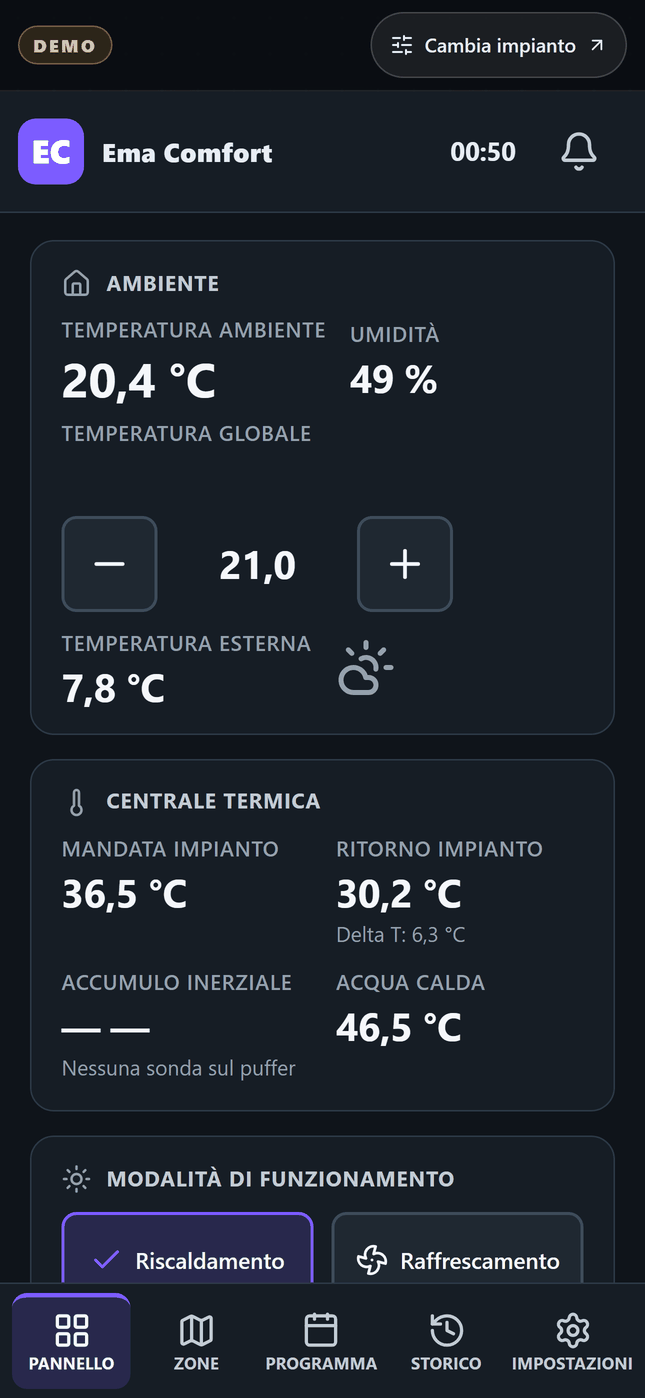
The same house, in a pocket. Below 900 pixels the app drops the wall-panel framing and becomes a phone screen — the plant room, the hot water and every zone, from wherever the family happens to be.
How a plant gets on it
Three steps, and the third one is the product
Nothing here is a portal to fill in first. The controller is what runs the plant; the app is a window onto it and a remote control for it.
The controller goes in
A modular unit in the plant room, plus the I/O modules the plant needs. The regulation logic lives there and only there — a flat phone or a restarted panel must never leave a house without heating.
The installer maps the channels
Each probe and each output is given its meaning, its sensor type and its calibration, then assigned to a zone or to a plant function. This is where a plant stops being wires and becomes a system.
Everyone gets the same picture
The family opens the panel; the installer opens the fleet. One plant, one set of readings, two views — and the installer keeps theirs from wherever they happen to be.
Ema Comfort is at the stage where the software is complete and demonstrable and the controller hardware is being built. That is exactly why this page asks for your interest rather than your card.
Questions
What installers ask first
Every answer below is what the product does today, not what it is planned to do.
Does it work with a controller I did not install?
It reads one. A third-party system is brought in through a connector, and everything it publishes appears on the same screens as an Ema Comfort plant. Commands are refused structurally rather than by convention, and the app names the reason instead of failing quietly. History for a third-party source is not kept yet — that is what the connector work still owes. The first connector built is for Hive.
Do my customers see my brand or yours?
Yours. On your own address the app carries your name, your monogram, your claim and your accent colour, resolved from the host — there is no separate build per installer. Inside the app the name Ema Comfort appears only under Settings › About. The sign-in screen still carries the platform name today; that is on the list.
What happens if the internet goes down?
The plant keeps running. The regulation logic lives in the controller and never in the app, so a lost connection costs you the remote view, not the heating. The app is honest about it: values go out of date and commands are refused, rather than appearing to have been sent.
Can I see what the plant was doing last week?
Yes. History is kept by day, week and month for the resident, and at one-minute resolution over twenty-four hours in the technical diagnostics. It exports as a spreadsheet whose header carries the plant, the period and the resolution.
Where does the data live?
On AWS in London (eu-west-2), in puglieseweb LTD’s own account. The company’s trust page lists the sub-processors, the retention periods, and the things that are not in that region — written out rather than glossed over.
Read the trust pageCan I try it without talking to anyone?
That is what the sandbox on this page is for. Compose a plant that looks like one of yours, open the technical area with the demo credentials, and decide whether the channel table is the one you would want in front of you on a call-out.
Open the sandboxWhen can I buy it?
There is no date on this page, because a date we are not sure of is worse than none. The software is demonstrable today; the controller hardware and its certification are the work between here and a price. Register your interest and you will hear before it opens, and again when it does.
Anything else — write to us directly at info@puglieseweb.com
The rest of the family
What else puglieseweb LTD builds
Ema Comfort is one of four. They share a company, an account and a way of working, and each one is bought on its own.
- Live
Ema Answers
The assistant that answers for your business, everywhere your customers are — it reads your website, replies in your customer’s language and emails you every enquiry.
Visit the site - Coming soon
SystemDox
Documentation that keeps up with the code — scanned from your repositories, published as a portal, staleness flagged before anyone trusts a stale page.
Visit the site - You are here
Ema Comfort
Heating and hot-water systems managed from one app — for installers and the homes they look after.
What it does - Live
Custom AI solution (App, Automation, etc.)
An app, an automation or an AI tool built around how your business works — when nothing off the shelf fits.
Register your interest
Register your interest
Tell us what you look after
Ema Comfort is not on sale yet. Tell us what you look after and we will come to you first when it opens — and shape what it does around what you need it to do.
The spam check did not load, so this form cannot be submitted from your browser. Please write to us directly instead — the address is below, and it reaches the same people.
Would rather just write? The address is info@puglieseweb.com